How to Read, Write, and Debug Cron Expressions Without Memorizing the Syntax
DecoToolkit Team
Product & Content
Cron jobs run the internet. They send newsletters, trigger database backups, clear caches, poll APIs, and hundreds of other scheduled tasks. The syntax that controls all of this is a five-field string — and most developers have to look it up every time they write one. This guide breaks down cron expressions from scratch, walks through the most common patterns, and shows how to test a schedule visually before it runs on your server.
What Is a Cron Expression?
A cron expression is a compact string that tells a scheduler when to run a task. It looks like this: "0 9 * * 1" — which means every Monday at 9:00 AM. Each position maps to a unit of time, separated by spaces.
The Five Fields
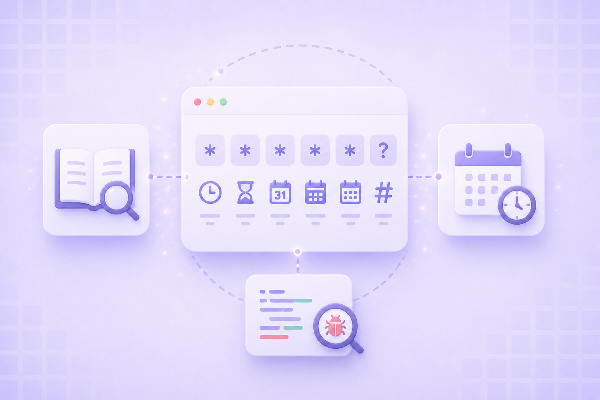
From left to right, the five fields are: Minute (0–59), Hour (0–23), Day of Month (1–31), Month (1–12), and Day of Week (0–7, where both 0 and 7 represent Sunday). An asterisk (*) in any field means "every possible value" for that unit.
So "* * * * *" runs every minute of every hour of every day — rarely what you want in production.
Special Characters
Beyond numbers and the wildcard, cron supports three special characters:
- Comma (,): lists multiple values. "1,15 * * * *" runs at minute 1 and minute 15 every hour.
- Hyphen (-): defines a range. "0 9-17 * * *" runs every hour between 9 AM and 5 PM.
- Slash (/): defines a step. "*/15 * * * *" runs every 15 minutes.
Common Cron Patterns
Here are the patterns that cover most real-world use cases:
- "0 * * * *" — every hour, at the top of the hour
- "0 0 * * *" — every day at midnight
- "0 9 * * 1-5" — every weekday at 9 AM
- "0 0 * * 0" — every Sunday at midnight
- "*/5 * * * *" — every 5 minutes
- "0 0 1 * *" — the first of every month at midnight
- "0 0 1 1 *" — once a year, January 1st at midnight
- "30 18 * * 5" — every Friday at 6:30 PM
How to Build and Test Cron Expressions Visually
Writing cron expressions by hand is error-prone. A misplaced number can mean the difference between a job running every hour and never running at all. DecoToolkit's Cron Expression Builder solves this with a visual interface: you pick the minute, hour, day, and month using controls, and the tool assembles the cron string for you.
It also shows the next upcoming run times, so you can confirm the schedule is correct before you deploy. Here is how to use it:
- Open the Cron Expression Builder at decotoolkit.com/cron-expression-builder
- Select your schedule type: every N minutes, hourly, daily, weekly, monthly, or custom
- Set the specific time or interval using the input fields
- Copy the generated expression
- Review the "next runs" list to confirm the timing is exactly what you expect
You can also paste an existing cron expression into the tool to decode it — useful when you inherit a job and need to understand when it actually runs.
Common Cron Mistakes to Avoid
Day-of-week and day-of-month interact unexpectedly: most cron implementations treat them as OR, not AND. An expression like "0 0 15 * 1" runs on the 15th of every month AND every Monday — not only on Mondays that fall on the 15th.
Timezones trip up remote deployments: cron runs in the server's timezone, not yours. If your server is UTC and you want a job at 9 AM EST, you need "0 14 * * *".
Day-of-week numbering varies: some systems use 0–6 (Sunday to Saturday), others use 1–7. Always test with a visual builder before deploying to an unfamiliar environment.
Frequently Asked Questions
What is the difference between cron and crontab?
Cron is the background process (daemon) that runs scheduled tasks. Crontab is the configuration file you edit to define which tasks run and when. You manage cron jobs by editing a crontab with the "crontab -e" command.
How do I run a job every 30 minutes?
Use "*/30 * * * *". This runs at minute 0 and minute 30 of every hour. If you only want it during business hours, combine it with an hour range: "*/30 9-17 * * 1-5" runs every 30 minutes from 9 AM to 5 PM on weekdays.
Can cron schedule jobs to the second?
Standard Unix cron does not support seconds — the minimum resolution is one minute. Some extended schedulers (Quartz in Java, AWS EventBridge, GitHub Actions) add a sixth field for seconds, but these are not portable across systems.
What happens if a cron job is still running when the next trigger fires?
By default, a new instance starts regardless of whether the previous one is still running. This can cause overlapping runs and data conflicts. Use a locking mechanism like flock on Linux, or a job queue system, if you need to prevent concurrent execution.
How do I check if a cron expression is correct before using it?
Paste it into a visual cron builder that shows upcoming run times. DecoToolkit's Cron Expression Builder (decotoolkit.com/cron-expression-builder) displays the next scheduled runs so you can confirm the timing before deployment.