WebP vs JPG vs PNG: Which Format Should You Actually Use?
Équipe DecoToolkit
Produit & Contenu
Choosing the right image format is not just a technical detail. It affects quality, compatibility, loading speed, and even how easy it is to reuse an image across platforms. Three formats appear again and again in everyday workflows: WebP, JPG, and PNG. Each one is useful, but not for the same reasons.
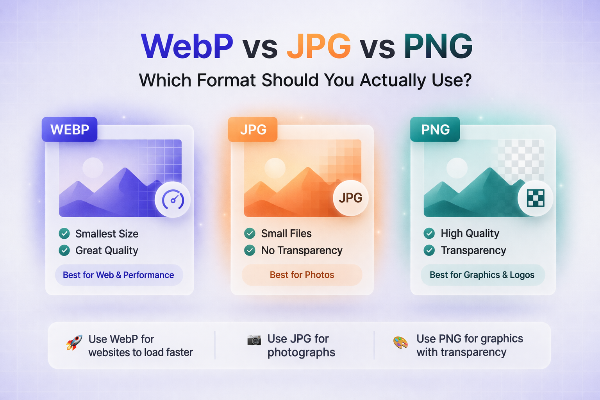
JPG is still the most universal option. It is widely supported by browsers, email clients, operating systems, CMS platforms, and image editors. For photos and realistic images, JPG usually offers a strong balance between file size and visual quality. If you need the safest format for broad compatibility, JPG is often the default answer.
PNG is best known for transparency and clean edges. It works well for logos, screenshots, interface elements, icons, graphics with text, and images that need a transparent background. PNG files can become large, especially for photographs, but they are often the right choice for design assets where clarity matters more than file size.
WebP was designed to improve efficiency on the web. It can produce smaller files than JPG and PNG while maintaining good visual quality, which makes it attractive for websites focused on performance. For modern browsers and many web workflows, WebP is a strong option. The catch is that support across legacy software, older systems, email workflows, and certain upload forms is still less universal than JPG or PNG.
So which one should you actually use? Start with the purpose of the image. If it is a photograph for a blog or landing page and broad compatibility matters, JPG is a safe bet. If it is a logo or interface asset with transparency, PNG is usually better. If it is going on a website where load speed matters and the platform supports it well, WebP may be the smartest choice.
There is also a practical workflow angle. Many designers and content teams keep a master asset in PNG or a source file, then export JPG for universal sharing and WebP for web delivery. This gives you flexibility without locking everything into one format.
One of the most common frustrations with WebP is when you download an image from the web and suddenly cannot use it where you want. Some CMS tools, design software, print workflows, and email tools still prefer JPG or PNG. That is why WebP conversion tools are so useful. They help bridge the gap between an efficient web format and more widely accepted outputs.
Compression matters too. JPG can look excellent, but aggressive compression can introduce visible artifacts. PNG can look perfect, but the file may be far too large. WebP often sits in the middle with very good efficiency, especially for web publishing. Still, no format wins in every situation.
If you are unsure, ask three simple questions. Does the image need transparency? Does it need maximum compatibility? Is web performance a priority? Those answers usually point you in the right direction.
The best workflows are practical, not ideological. Use the format that fits the goal. Convert when needed. And keep your original high-quality source when possible. That gives you the freedom to adapt images for the web, social media, print, or documents without starting over every time.